Math functions
“What is this?!”
Let’s start by visualizing the first function we see in Deforum within the camera movements.
Copy everything inside the brakets (don’t copy 0:)
Let me start just by saying that I had the worst grades ever in math. This just to say you don’t need any deep knowledge of math to understand what’s going on here
You can control specific parameters of Deforum with math functions like this.
I know it seems crazy but once you learn how to use them it’s gonna be easier then keyframing
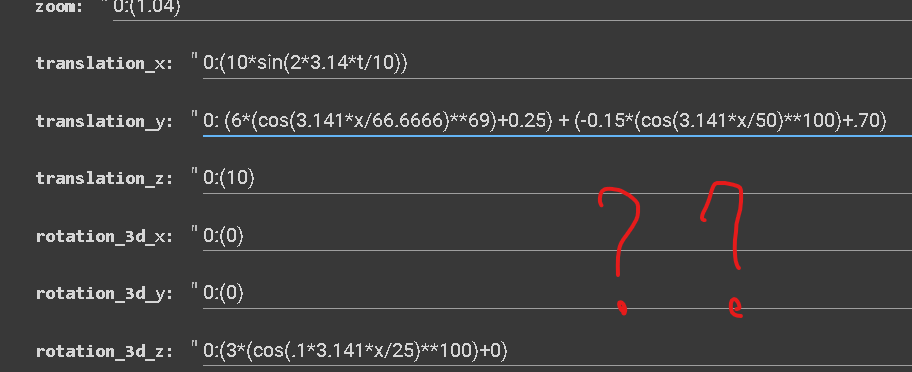
Be careful about commas, brackets, swaping the Xs for Ts, unwanted space bars between the numbers, when you transfer your formulas.
This is the part were most of the errors pop out in Deforum.
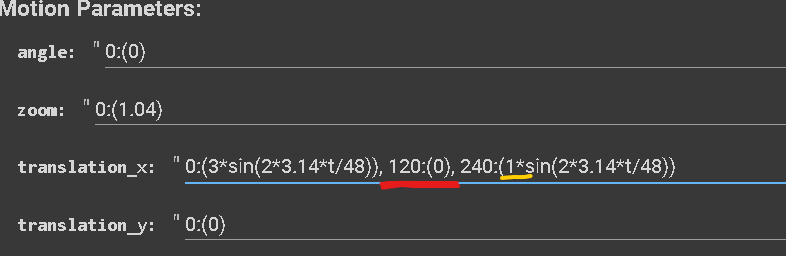
In this first example, the function’s amplitude (3*sin) is decreasing its value from 3 to 0 over the time of 120 frames.
Then over a time from 120 frames to 240 increasing to an amplitude of 1
The constant formula is the most important in my opinion because it allows you to control the strength schedule dynamically. \
This is the difference between amateur level of animations and top notch quality.


Paste the function into a functions visualizer (there’s many on the internet, all for free)
I like to use this one: https://graphtoy.com/ because it allows you to see more functions at the same time
Delete everything in the lines and paste your function, THEN SWAP THE T with an X.
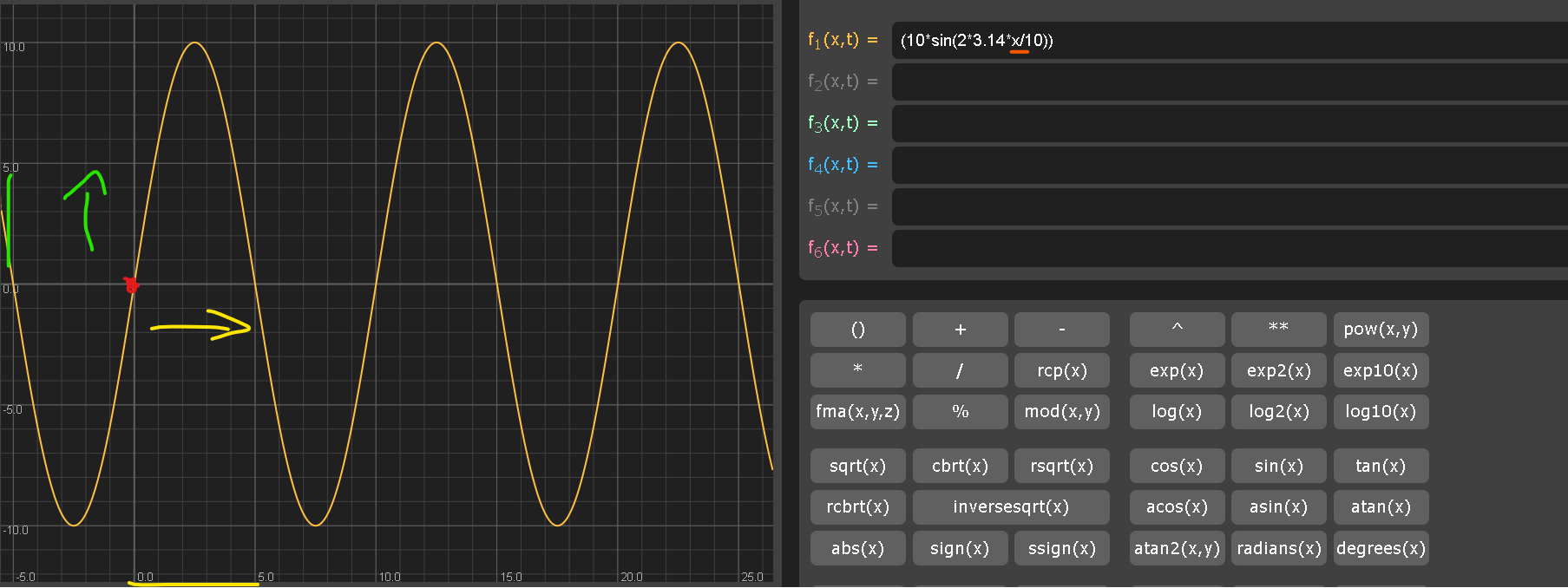
In the image, you can see that the function forms a sine wave shape.
THE RED DOT indicates the 0
And the axis from left to right represents the frames/time (yellow arrow)
The axis from bottom to top represents the amplitude of the value that the parameter will have when using this function (green arrow).

Let me explain what these 3 numbers mean:
10 is the amplitude of the waveform / the value that your parameter is gonna reach
2 is the frequency of the waveform / the speed that your parameter will increase or decrease
10 is the frame rate of the waveform / after how many frames functions complete its cycle and start again
With this formula we are saying to the translation x to:
Go from 0 to 10 and back to 0 in 5 frames (positive cycle of the wavefrom)
Then, go from 0 to -10 and back to 0 in 5 frames for a total of 10 frames (negative cycle of the wavefrom)
Let’s have a look at the formula to generate a sinewave (sin).
Another very important function is the constant (cos).
Ultimately you can add more keyframes to your setting and get as crazy as you want!
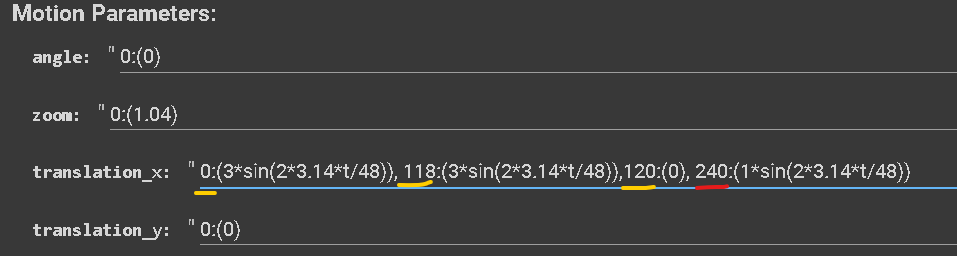
Or keep the same amplitude from 0 to 118, drop it at 120 and slowly go back when you reach 240 frames
Here are a few examples on how this function can effect your parameter:
(3*sin(2*3.14*t/25))
TRANSLATION X
TRANSLATION Z
(6*sin(2*3.14*t/25))
TRANSLATION X
TRANSLATION Z
translation X - 0:(3*sin(2*3.14*t/25))
strength schedule - 0: (-0.35*cos(3.141*t/12)**100+0.75)
translation X - 0:(3*sin(2*3.14*t/25))
strength schedule - 0: (-0.15*cos(3.141*t/12)**100+0.75)
.....
.....
Updated on:
— 15/01/2023 Deforum version
I know that in the beginning it seems hard, but Graphtoy is the best way to visualize your functions, because you can perfectly see their behavior.
Once you comprehend their behavior, and know the translation of x, for example, you have an idea of how it will impact the parameter.
All that's left is to get used to it.
You can see how by using this function on the strength schedule we can keep our render always “fresh” and reduce the artifacts significantly. In the first example, the value was exaggerated, causing the animation to become jumpy. Reducing the value in the second example helped just to reduce artifacts generated from the camera movement but the frames were becoming less “fresh” with the time.
Complex functions
you can “mix” different functions
use “+” “-” “*” to summ, subtract, multiply
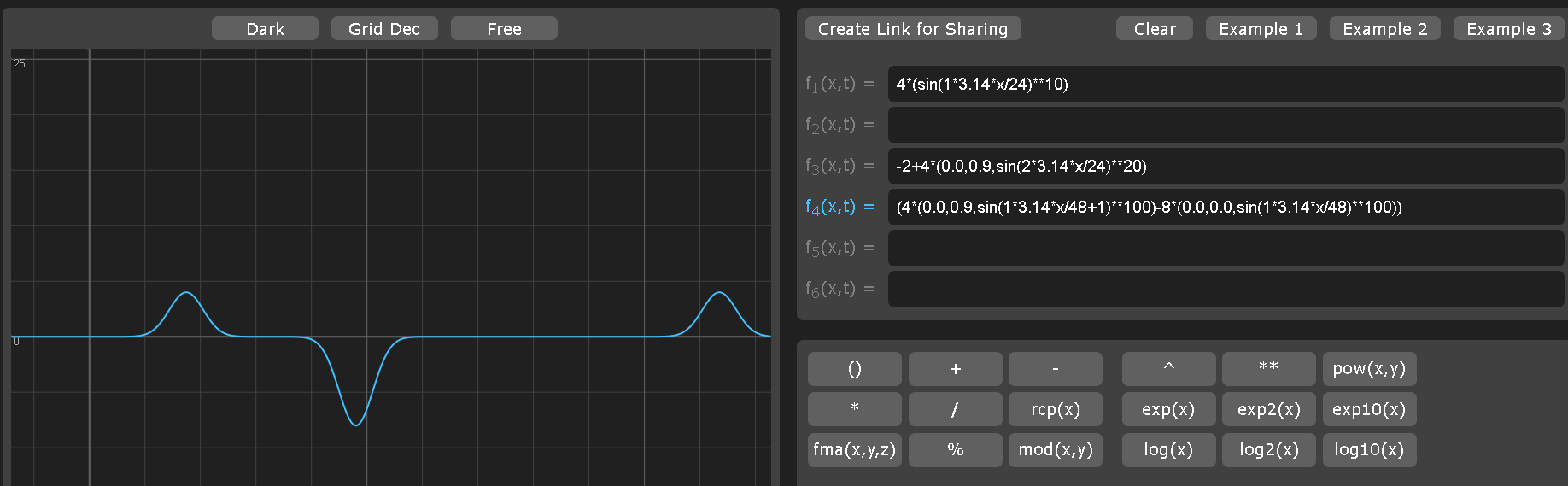
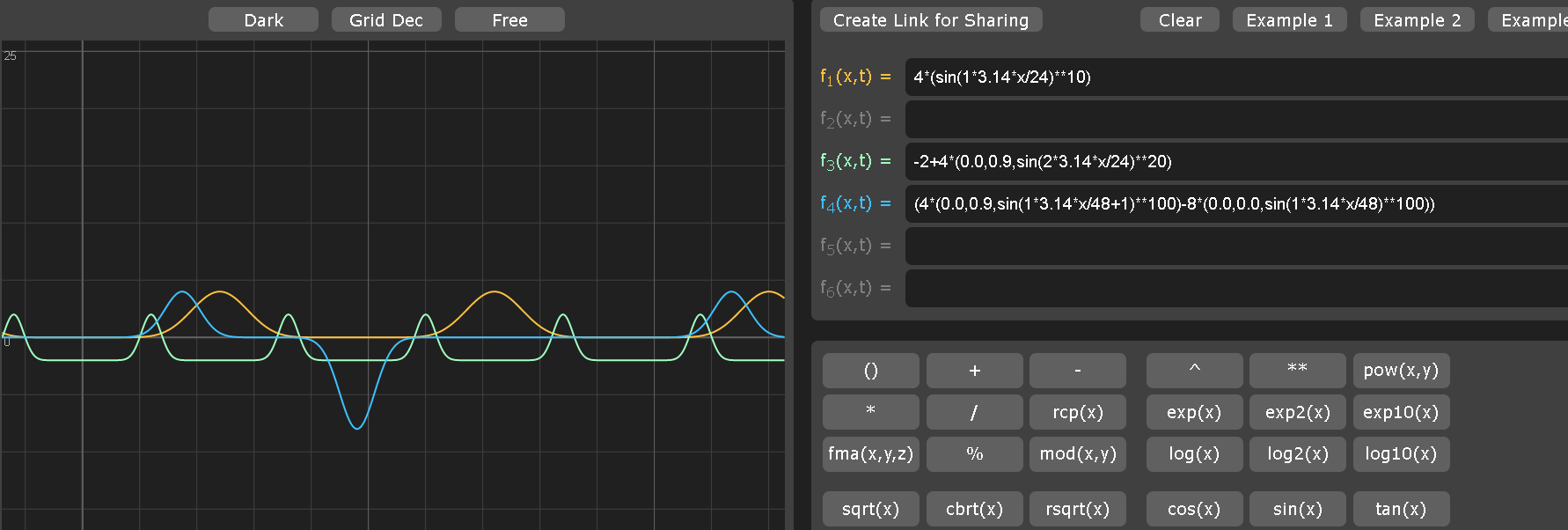
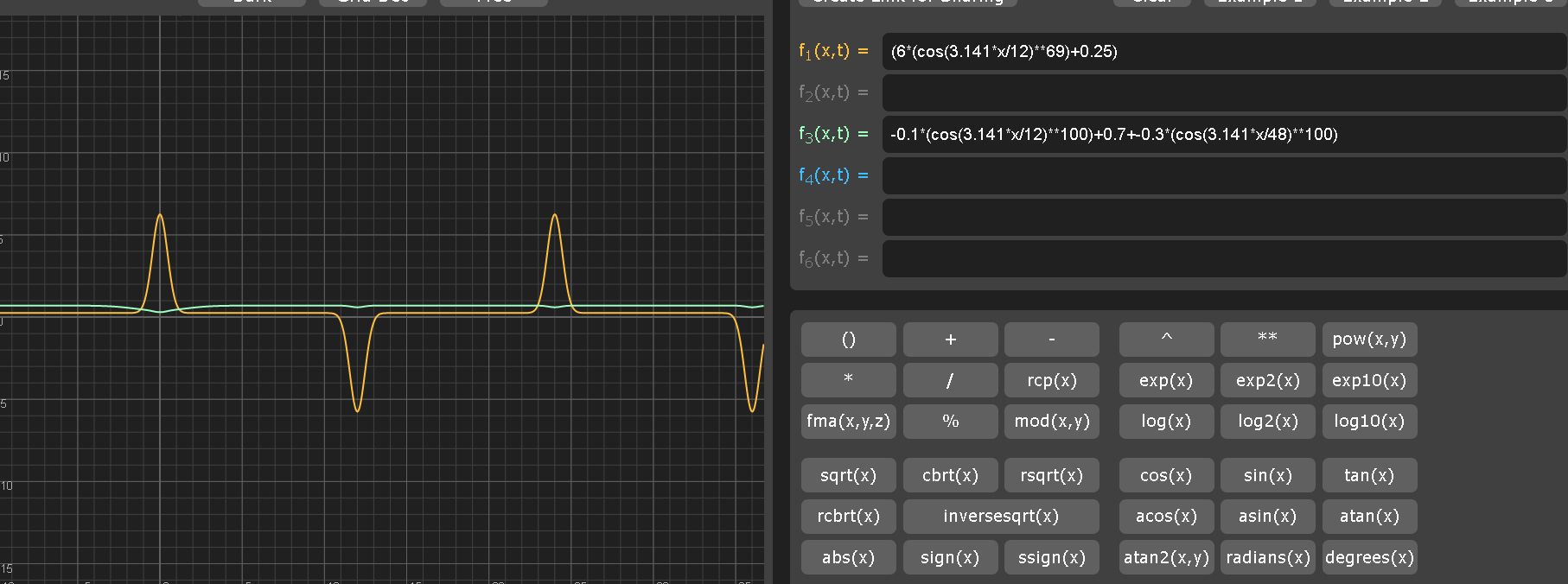
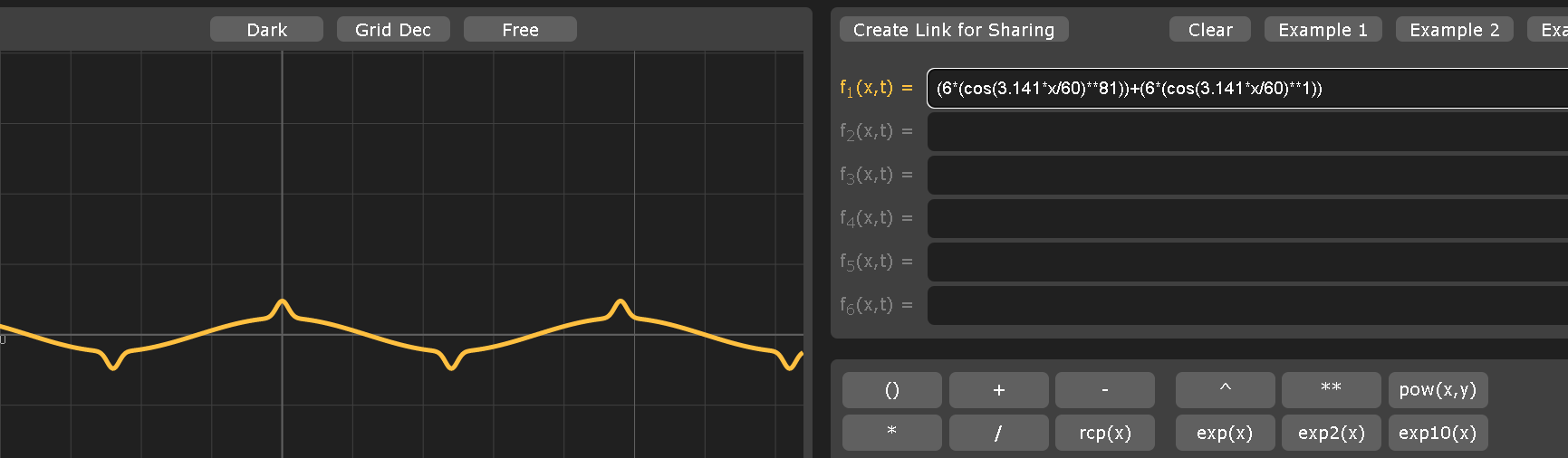
In this example, you can see how the function in yellow is nothing else that a constant function with a **69 modifier
The modifier value is going to change the “tightness” of the cycles, shaping them into this peaks.
Values of pair number should generate peaks only in one “direction” (up if the amplitude is posive or down for negative).
Values of dispair numbers should generate peaks in both “directions” like in the image
The function showed in green. It's the same function copied and pasted next to each other, I only changed the frame rate and the amplitude
I am telling: drop -0.1 out of 0.7 every 12 frames + drop -0.3 every 48 frames
At this point is just getting experimental, once you know that you can mix funcations toghter sky is the limit.
Get crazy creating your wacky functions!
This leads us to another point, which is:
Here at The Dor Brothers we see ourselves more as creatives.
We are not programmers, or mathematical guys in this case.
Those people are the real Gods providing us with the tools to create amazing animations.
We are just passionate enough to step into the unknown and then show you the creative ways to use these tools.
Honestly, most of the stuff above I found out by myslef just by messing around with the values I showed.
This is just to say that with enough patience and the right mindset it’s just a matter of time .